Power Apps Sitemap: Open a specific view from sitemap
You may need to point your sitemap items to a specific table view. You can achieve this by using a special URL in the sitemap sub area with the view’s parameters and Power Apps host will manage to detect your intent when rendering the application navigation.
Model-driven Power Apps (UCI) format:
/main.aspx?pagetype=entitylist&etn=opportunity&viewid={83DCA8EC-B505-E811-80FB-00155D036800}
Old Dynamics 365 Web Client / MoCA format
If you used your existing sitemap from Dynamics 365 Web Client while creating an App or tried to use the former URL style, these custom links don’t show up in the navigation panel of model-driven apps. Every App makes its own sitemap even when you use an existing solution to create the App so you don’t need to worry about breaking your current user experience.
/_root/homepage.aspx?etn=opportunity&viewid={73E5C4A5-6727-E811-80FF-00155D036800}
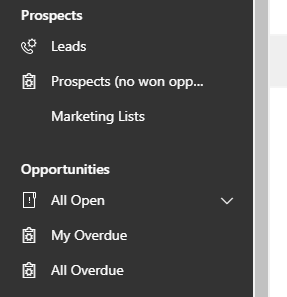
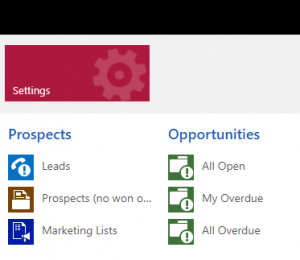
And now if you hit Publish button you will see respective sub areas in the navigation panel.
Note
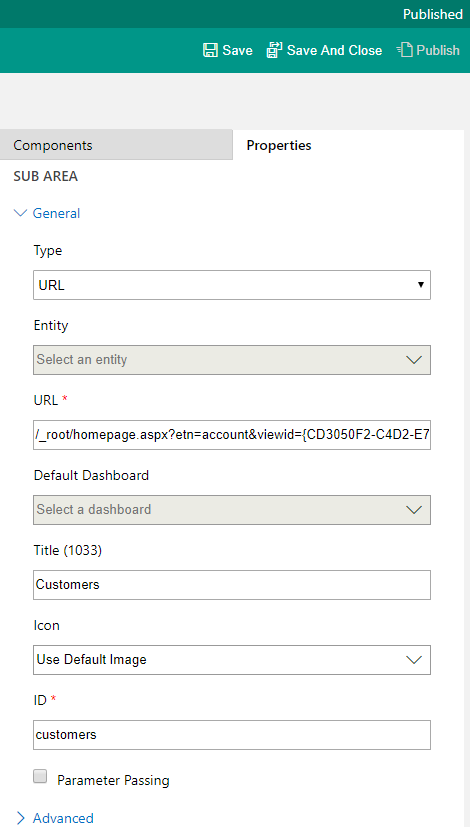
If your URL query contains entity type code that contains an integer code for the entity (e.g. etc=4) it is no longer supported. You should replace it with entity logical name of the entity (e.g. etn=account).
Comments
Harshvardhan Tejwal
slight correction in unified exact combination is for url:
/_root/main.aspx?appid=e8fc7253-eb43-ea11-a833-000d3a799888&pagetype=entitylist&etn=account&viewid=596ad2cd-da5d-ea11-a811-000d3a799417&viewType=1039
root and main.aspx combination is the key
Pablo Guillén
Gracias!
Saranya
Hi,
I have requirement to navigate to entitylist from UCI to Classic. Achieved it ,but if I navigate to entitylist page it is not giving me the sitemap. Any idea on this? Thanks in Advance.
Cameron
Hi Tomas, that totally worked to a specific view I wanted on my contacts! I’m trying to a link to the Templates elsewhere in my SiteMap, but the URL /tools/templates/templates.aspx doesn’t work anymore without me hard coding the full URL, any ideas? Cheers Cameron.
To submit comments, go to GitHub Discussions.